


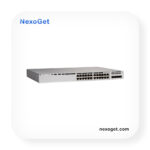
Cisco C9200L-24P-4G-E Switch
- 24 × Gigabit Ethernet PoE+ Ports
- 4 × 1G Fixed Uplink Ports
- Up to 740W PoE Budget
- Cisco Catalyst 9200L Series
- Enterprise-Class Managed Switch
- StackWise-80 Stacking Support
- Advanced Network Security
- Ideal for Enterprise & Branch Networks
4.700,00
Cisco Catalyst C9200L-24P-4G Switch – Enterprise-Class Gigabit PoE+ Connectivity
Watch Product Video Cisco C9200L-24P-4G-E Switch
Download PDF Datasheet|Cisco C9200L-24P-4G-E Switch
The Cisco Catalyst C9200L-24P-4G Switch is an enterprise access-layer switching solution designed to connect network devices, support Power over Ethernet Plus (PoE+), and provide reliable connectivity for business networks. With 24 Gigabit Ethernet PoE+ ports and four fixed 1G uplink ports, this switch is suitable for organizations that require dependable wired access for computers, IP phones, wireless access points, surveillance cameras, and other Ethernet-connected equipment.
Part of the Cisco Catalyst 9200L Series, the C9200L-24P-4G combines managed Layer 2 and Layer 3 network capabilities, enterprise security features, centralized management options, and stacking support. Its port configuration makes it a practical option for office access closets, educational institutions, retail environments, and branch networks that need to connect multiple endpoints without deploying a separate power adapter for every compatible device.
Businesses evaluating this model can also explore the Cisco C9200L-48P-4G Switch for higher port density or the Cisco C9200L-24P-4X Switch when faster uplink connectivity is required. Selecting the right configuration helps organizations balance endpoint capacity, uplink requirements, and future network expansion.
Cisco C9200L-24P-4G Technical Specifications
The following table summarizes the principal hardware characteristics of the Cisco Catalyst C9200L-24P-4G. Exact software entitlements, power-supply configuration, and ordering suffix should be checked against the specific unit offered for purchase.
| Specification | Details |
|---|---|
| Product family | Cisco Catalyst 9200L Series |
| Model | C9200L-24P-4G |
| Switch type | Managed enterprise access switch |
| Downlink ports | 24 x 10/100/1000 Mbps Ethernet PoE+ |
| Uplink ports | 4 x fixed 1G uplinks |
| PoE capability | IEEE 802.3af PoE and IEEE 802.3at PoE+, subject to supported device and power budget |
| Maximum documented PoE budget | Up to 740 W for the C9200L-24P-4G platform configuration |
| Switching architecture | Cisco Catalyst enterprise switching platform |
| Stacking | StackWise-80 support |
| Management | Command-line interface and supported Cisco network management solutions |
| Security | Enterprise access security and policy features, depending on software and configuration |
| Deployment | Enterprise offices, campus access networks, and branch environments |
| Power supply | Configuration-dependent; verify the supplied PSU and regional power cord |
| Software license | Confirm the exact Network Essentials or Network Advantage ordering variant |
Twenty-Four Gigabit Ethernet PoE+ Ports
The switch provides 24 copper Ethernet access ports supporting 10 Mbps, 100 Mbps, and 1 Gbps connectivity. This allows organizations to connect a mixture of standard office computers, printers, IP telephones, access points, and other compatible network devices using familiar Ethernet cabling.
For businesses with a moderate number of endpoints, 24 ports offer a useful balance between network capacity and rack-space requirements. The configuration can simplify cabling in a small or medium-sized access layer while leaving room for separate uplinks to distribution switches, routers, or other infrastructure.
Connecting Business Devices
Typical endpoint deployments include desktop computers, network printers, IP phones, wireless access points, and compatible security cameras. Actual compatibility depends on the device’s Ethernet interface, power requirements, VLAN configuration, and network policy.
Four Fixed 1G Uplink Ports
The four fixed 1 Gigabit uplinks connect the access switch to upstream network equipment. Depending on the topology, these connections can be used for links to distribution switches, aggregation equipment, or other supported infrastructure. Fiber connectivity requires compatible transceivers and cabling where applicable.
These uplinks are designed for environments where 1G upstream connectivity is sufficient. If the network requires 10G uplinks to accommodate heavier aggregation traffic or additional headroom, compare the Cisco C9200L-24P-4X and Cisco C9200L-48P-4X configurations before purchasing.
Power over Ethernet Plus for Simplified Deployment
Power over Ethernet allows a compatible network switch to deliver electrical power and data over the same Ethernet cable. The C9200L-24P-4G supports PoE+, helping reduce the need for individual power adapters and making it easier to install supported devices where electrical outlets are limited.
PoE+ for IP Telephony
IP telephones can receive network connectivity and power through a single Ethernet connection when supported by the phone and switch configuration. This simplifies desk installations and may make centralized power management easier for IT teams.
For compatible Cisco telephony deployments, NexoGet also lists several IP phone models, including the Cisco CP-7841-K9 IP Phone, Cisco CP-7821-K9 IP Phone, Cisco CP-7861-K9 IP Phone, and Cisco CP-8841-K9 IP Phone.
Wireless Access Points and Surveillance Devices
PoE+ can also simplify installations for supported wireless access points and security cameras. Instead of arranging a separate electrical connection at every device location, network administrators can use compatible Ethernet runs to provide connectivity and power.
Before connecting a deployment of access points or cameras, calculate the total power demand and verify the available PoE budget. The maximum platform budget is not the same as the power available to every port simultaneously under every possible hardware configuration.
Enterprise Switching and Network Management
The Cisco Catalyst 9200L family is designed for managed enterprise networks where administrators need visibility, segmentation, access control, and consistent configuration across multiple switches. Supported capabilities depend on the installed Cisco IOS XE software release, licensing tier, and network design.
VLANs and Network Segmentation
Virtual LANs allow administrators to separate traffic into logical network segments. For example, a company can place employee computers, voice endpoints, guest-facing infrastructure, and management interfaces into different VLANs according to its network policy.
Segmentation can improve administrative control and reduce unnecessary communication between device groups. However, VLANs must be configured correctly alongside routing, access-control policies, and other security measures to achieve the intended separation.
Quality of Service for Business Applications
Quality of Service (QoS) features can help administrators classify and prioritize selected traffic according to business requirements. In an appropriately configured network, this can assist with voice and other latency-sensitive applications when the network experiences congestion.
QoS is not a substitute for sufficient bandwidth or correct network design. Its benefits depend on end-to-end policy consistency, traffic characteristics, and the capabilities of the connected infrastructure.
Monitoring and Troubleshooting
Managed switching provides administrators with tools for examining interface status, link errors, traffic behavior, and configuration state. These tools can help IT teams investigate connectivity issues, identify misconfigured ports, and maintain a clearer view of the access network.
Organizations should establish documented configuration standards, secure management access, and routine backup procedures to improve operational consistency across their switching infrastructure.
Security for Enterprise Access Networks
Network access switches form an important part of an organization’s security architecture. The Cisco Catalyst 9200L platform supports enterprise security capabilities that can help administrators control device access and apply network policies when the appropriate software and configuration are in place.
Access Control and Device Authentication
Depending on the software release and deployment, administrators can use supported authentication and access-control mechanisms to regulate which devices are permitted to connect to the network. These controls can be integrated into broader identity and security policies.
Security planning should include strong administrative credentials, restricted management access, appropriate software maintenance, and a documented process for handling unauthorized devices. Available features should be confirmed against the exact license and software version before a design is finalized.
Resilience and Operational Continuity
Network resilience depends on the complete topology rather than the access switch alone. Redundant upstream connections, suitable power arrangements, configuration backups, and a tested recovery plan can help reduce the operational impact of equipment or link failures.
The C9200L family supports StackWise-80 stacking. Stacking can simplify the management of supported switch groups and support a larger logical access-switch deployment. Buyers should verify the number of supported stack members, required stacking cables, and exact configuration requirements for their intended design.
Recommended Deployment Scenarios
Small and Medium-Sized Business Networks
The C9200L-24P-4G is suitable for offices that need a managed 24-port access switch with PoE+. It can connect wired workstations, printers, phones, and other business endpoints while providing uplinks to the wider network.
Education and Campus Access
Schools, training centers, and administrative buildings may use PoE-capable access switches to connect classroom devices, supported wireless access points, and office equipment. Network segmentation can help separate administrative systems, staff devices, and other traffic according to institutional policy.
Retail and Distributed Branch Locations
Retail branches and remote offices often need a practical way to connect point-of-sale systems, staff workstations, wireless infrastructure, and voice endpoints. The C9200L-24P-4G provides an enterprise-managed access layer for deployments where its 24-port capacity and 1G uplinks meet the site’s requirements.
IP Telephony and Wireless Infrastructure
Where the endpoint count is appropriate, PoE+ simplifies cabling for supported phones and wireless access points. Organizations should assess the power consumption of every connected device and leave an appropriate margin for planned expansion.
Compare the Cisco Catalyst 9200L with Other NexoGet Switches
Choosing an enterprise switch requires more than comparing port counts. Uplink speeds, PoE requirements, software licensing, stacking needs, and future expansion plans should all be considered.
| Alternative model | Primary comparison | When to consider it |
|---|---|---|
| Cisco C9200L-24T-4G | 24-port data-only configuration with 1G uplinks | When PoE is not required at the access layer |
| Cisco C9200L-24P-4X | 24-port PoE+ configuration with 10G uplinks | When higher-speed upstream connectivity is needed |
| Cisco C9200L-48P-4G | 48-port PoE+ configuration with 1G uplinks | When more wired endpoints are required |
| Cisco C9200L-48T-4X | 48-port data-only configuration with 10G uplinks | When port density and faster uplinks matter more than PoE |
| Cisco C9200-24P | Catalyst 9200 modular-uplink family | When a different uplink and hardware architecture is preferred |
| Cisco C9200-48P | 48-port Catalyst 9200 PoE+ model | For higher endpoint density in an enterprise access layer |
Other Enterprise and Business Switching Options
Organizations evaluating different network sizes or feature requirements can also compare the following models available in the NexoGet catalog:
- Cisco Catalyst C9300-24S-E for a different Catalyst 9300 switching configuration.
- Cisco Catalyst C9300X-12Y-E for environments considering higher-speed enterprise switching.
- Cisco Catalyst C9500-48Y4C-E for evaluating higher-capacity enterprise switching requirements.
- Cisco C1300-24P-4G for a business switching alternative.
- Cisco C1300-48FP-4X for comparing a higher-port-count PoE+ configuration.
- Cisco C1300X-24P-4X for evaluating another PoE-capable switching platform.
- Cisco C1300X-48P-4X for a higher-density alternative within the C1300X family.
- Cisco C1300X-10NU-2X for comparing a different compact switch configuration.
- Cisco C1200-48P-4X for evaluating an alternative 48-port PoE switch.
- Cisco C1000-24P-4G-L for comparing another Cisco access-switch family.
How to Select the Correct C9200L Configuration
Confirm the Uplink Requirement
The C9200L-24P-4G has four fixed 1G uplinks. This can be appropriate for access networks with moderate upstream traffic and compatible 1G infrastructure. If the distribution layer requires 10G connectivity, evaluate the corresponding 4X model rather than assuming that the 4G version offers interchangeable uplink speeds.
Calculate the PoE Budget
List every powered endpoint, its expected power draw, and the number of devices likely to operate simultaneously. The platform’s maximum documented PoE budget is a planning reference, not a guarantee that every connected device can receive unlimited power. Verify the power-supply configuration and the requirements of high-consumption endpoints before installation.
Check Software Licensing
Cisco ordering identifiers can include software-tier suffixes such as Network Essentials and Network Advantage. These variants may differ in supported features and entitlements. Confirm the exact SKU, licensing terms, software version, and transfer or renewal requirements with the seller before ordering.
Plan for Expansion
Estimate the number of current and future endpoints, the number of required uplinks, and the available rack and power capacity. A 24-port switch may be sufficient for a compact office, while a 48-port configuration may reduce the need for an additional access switch as the network grows.
Installation and Maintenance Considerations
Before deployment, check rack compatibility, airflow requirements, power availability, cable labeling, and access to the management interface. Follow the hardware installation instructions for the exact unit and ensure that ventilation is not obstructed.
For initial configuration, administrators should define management addressing, secure administrative access, configure VLANs and trunk ports where required, establish access policies, and verify uplink connectivity. Test PoE delivery with representative devices and document the final configuration.
Ongoing maintenance should include monitoring port errors, reviewing logs, backing up configurations, checking software advisories, and applying supported updates according to the organization’s change-control procedures. Network changes should be tested and documented to reduce the risk of service disruption.
Why Source Cisco Switching Equipment from NexoGet?
NexoGet provides a catalog of networking equipment for business and enterprise buyers. Customers evaluating the Cisco Catalyst C9200L-24P-4G can review related switching products, compare port configurations, and contact the team to clarify product availability and ordering details.
Visit the NexoGet Shop to explore additional networking equipment, learn more about the company on the About Us page, or use the Contact Us page to ask about the required configuration. You can also review the Warranty information before placing an order.
For general information about Ethernet switching and network infrastructure, read What Is a Cisco Switch? This resource can help buyers understand the role of managed switches in connecting endpoints and organizing a business network.
Frequently Asked Questions About Cisco C9200L-24P-4G
How many Ethernet ports does the Cisco C9200L-24P-4G have?
It has 24 Gigabit Ethernet PoE+ access ports and four fixed 1G uplink ports. The access ports connect compatible endpoint devices, while the uplinks connect the switch to upstream network equipment.
Does the C9200L-24P-4G support PoE+?
Yes. The model supports PoE+ for compatible devices. The available power depends on the platform’s power budget, the power-supply configuration, and the requirements of connected endpoints.
Can it power IP phones and wireless access points?
Yes, when the connected phones or access points support the switch’s PoE standards and remain within the available power budget. Always verify individual device power requirements before deployment.
Does this model have 10G uplinks?
No. The C9200L-24P-4G configuration has four fixed 1G uplinks. Buyers requiring fixed 10G uplinks should compare the C9200L-24P-4X configuration.
Is the C9200L-24P-4G suitable for enterprise networks?
It is designed for enterprise access-layer deployments, including offices and branch environments. Suitability depends on port capacity, uplink bandwidth, PoE demand, licensing, and the intended network architecture.
What should buyers verify before ordering?
Confirm the complete product SKU, software license tier, hardware condition, power-supply configuration, included accessories, warranty terms, and current availability. These details should match the requirements of the intended installation.
Conclusion: Cisco Catalyst C9200L-24P-4G for Managed PoE+ Networks
The Cisco Catalyst C9200L-24P-4G Switch is a practical option for organizations seeking 24-port Gigabit Ethernet access, PoE+ support, and four fixed 1G uplinks in an enterprise-managed switching platform. It can help simplify connectivity for business endpoints, IP telephony, compatible wireless access points, and other powered network devices.
Before making a purchase, compare the available C9200L variants, confirm the exact software and hardware configuration, and calculate both uplink capacity and PoE demand. For assistance with product selection or availability, contact NexoGet and identify the exact Cisco part number required for your network.
“`
| Weight | 7 kg |
|---|---|
| Dimensions | 50 × 40 × 15 cm |
| Width |
44.5 cm |
| Required mains voltage |
Alternating current 100-240 V (50 – 60 Hz) |
| Flash memory |
4 GB |
| Housing type |
Rack mountable |
| Device type |
Switch – 24 ports – L3 – stackable |
| Weight |
4.71 kg |
| Size of the MAC address table |
16,000 entries |
| Manufacturer |
Cisco |
| Height |
28.8 cm |
| Jumbo frame support |
9198 bytes |
| Capacity |
Virtual networks: 1 ,IPv4 routes: 11000 ,IPv4 entries in routing table: 3000 ,IPv6 entries in routing table: 1500 ,Multicast scale: 1000 ,ACL tier entries: 1500 ,FNF entries: 16000 ,VLAN support: 1024 ,Switched virtual interfaces |
| Perfomance |
Multi-bandwidth: 80 Gbit/s ,Switching capacity: 56 Gbit/s ,Forwarding rate: 83.33 Mpps |
| Features |
Quality of Service (QoS), Cisco StackWise Technology, Rapid Per-VLAN Spanning Tree Plus (PVRST+), Shaped Round Robin (SRR), PXE support, Remote Switch Port Analyzer (RSPAN), NetFlow, Energy Efficient Ethernet, Management Information Base (MIB), Clas |
| Maximum storage temperature |
70 °C |
| Maximum supported number |
2 |
| Minimum storage temperature |
-40 °C |
| Ports |
24 x 10/100/1000 (PoE+) + 4 x Gigabit SFP (uplink) |
| Port Count |
24 port |
| PoE Budget |
370W with one 600W AC power supply; up to 740W with an additional compatible power supply |
| PoE |
PoE+ |
| PoE Capability |
PoE ,PoE+ |
| Product certifications |
CISPR 22 Class A, CISPR 24, EN 61000-3-2, EN 61000-3-3, EN55024, EN 61000-6-1, AS/NZS 60950-1, CCC, ICES-003 Class A, UL 60950-1, IEC 60950-1, EN 60950-1, RoHS, AS/NZS 3548 Class A, BSMI Class A, VCCI Class A, CNS 13438, EN 55022 Class A, FCC CFR47 Par |
| RAM |
2 GB |
| Management Type |
Fully Managed (Layer 2) |
| Redundant power supply |
Optional |
| Remote Administration Log |
SNMP 1, RMON 1, RMON 2, SNMP 3, SNMP 2c, CLI, NETCONF, RESTCONF |
| Routing Protocol |
OSPF, RIP-1, RIP-2, EIGRP, VRRP, PIM-SM, EIGRP for IPv6, PIM-SSM, Policy-Based Routing (PBR), RIPng, MSTP |
| Interfaces |
24 x 1000Base-T RJ-45 PoE+ – 30 W ,4 x 1000Base-X SFP Uplink ,1 x Network Stack Device ,1 x Management (LAN) RJ-45 ,1 x Console RJ-45 |
| Power supply unit |
Internal power supply – hot-plug |
| Depth |
4.4 cm |
| Subtype |
Gigabit Ethernet |
| Important product information |
The DNA license is not included and must be ordered separately. Please contact your sales representative. |
| Permissible humidity during storage |
5 – 90% (non-condensing) |
| Permissible humidity level in the workplace |
5 – 90% (non-condensing) |
| mtbf |
392,210 hours |
| Model |
C9200L-24P-4G |
| Product Type |
Managed Switch |
| Series |
Catalyst 9200L |
| Switching Layer |
Layer 3 |
| Total Ports |
28 |
| Ethernet Ports |
24 x 10/100/1000 Mbps |
| Uplink Ports |
4 x 1G SFP |
| PoE Support |
PoE+ |
| Switching Capacity |
56 Gbps |
| Forwarding Rate |
41.66 Mpps |
| Stacking Support |
StackWise-80 |
| Rack Mountable |
Yes |
| Chassis Height |
1U |
| Dimensions |
4.4 x 44.5 x 28.8 cm |
| Power Supply |
PWR-C5-600WAC (standard configuration) |
| Management |
Managed |
| Network Protocol |
Ethernet |
| Brand |
Cisco |


Sepideh karami –
Please share your experience, feedback, and suggestions with us. Your review helps us improve our products and services and helps other customers make informed decisions.